Posts

Showing posts with the label Assessment

Flipgrid is Flavour of the Month

Image
Flipgrid is a game changer when it comes to capturing authentic student voice within and beyond the classroom walls. The idea is simple, create a grid for your class then add a topic to engage and provoke discussion. Students can respond with a video reply, enjoying and interacting with the responses of their peers. As the teacher, all of this is within your control. You have the ability to set the video response time, allow fun features such as stickers and inking, moderate posts, reply with your own feedback and much more.   Anytime, Anywhere Learning Flipgrid works on any browser and also has a smartphone app for both iOS and Android. Hearing every students' voice becomes possible as learners share their ideas in their own time, without the pressure of public speaking. Original ideas resound as students are given the 'think time' to engage in self-reflection and generate their own authentic opinions in a safe environment.  Crossing Curriculum Boundaries ...
Top Three Ways to Give Students Feedback

Image
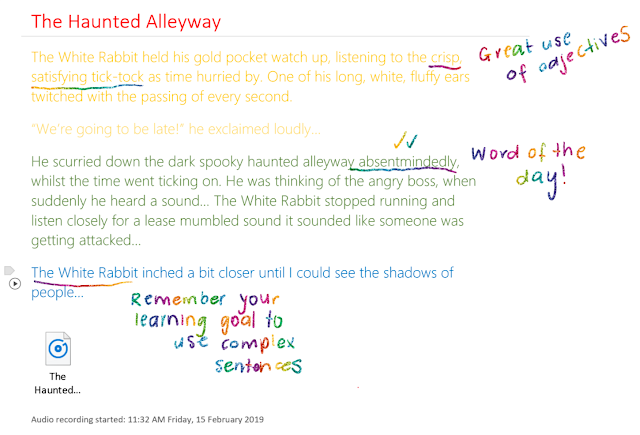
Specific, timely and goal-related feedback is key to helping students progress in their learning. In a bustling classroom with a jam-packed timetable, I struggled to find time to provide quality feedback to all of my students on a regular basis. With OneNote Class Notebook, feedback became a regular part of my daily and weekly routine due to these three time-saving features. Audio and Inking OneNote offers teachers the ability to mark and annotate student work using digital ink whilst at the same time recording audio feedback directly onto the OneNote page. I found that using a stylus to mark students' work provided a personal touch and showed students that their teacher had engaged with their work rather than 'impersonal' standard typed text. The great thing about this is that OneNote will automatically connect what you were saying at the time with any annotations you make on the page. Therefore if you are marking an extensive piece of writing with a lot o...

Tag, You're It!

Image
Tags in OneNote As announced by the OneNote team, Windows 10 and Mac OneNote users now have the ability to create and use custom tags. The update includes the ability to: ·         Create new custom tags ·         Search for custom tags ·         Have roaming tags across devices ·         Gather existing tags in a notebook and save as your own This is an exciting feature for both teachers and students as tags can be used to create to-do lists, identify important information and can now be customised to suit your own needs. Here are my top three ways of utilising tags in the classroom: To Do Tags: Using the Content Library in OneNote Class Notebook is a great way to create and share lessons with students. 'To do' tags in OneNote provide students with a clear and logical way to work through tasks that have multiple steps. W...